

Atlas-activation-brief.md. It takes under eight minutes and uses no generation credits.
This is a portable workflow proof—not a presentation-ready deck. The useful pattern is add → connect → run → inspect, which you can apply to richer pitch work later.
Before you start
Open a Canvas and keep these fabricated notes nearby:Atlas-activation-brief.md.
Build the workflow
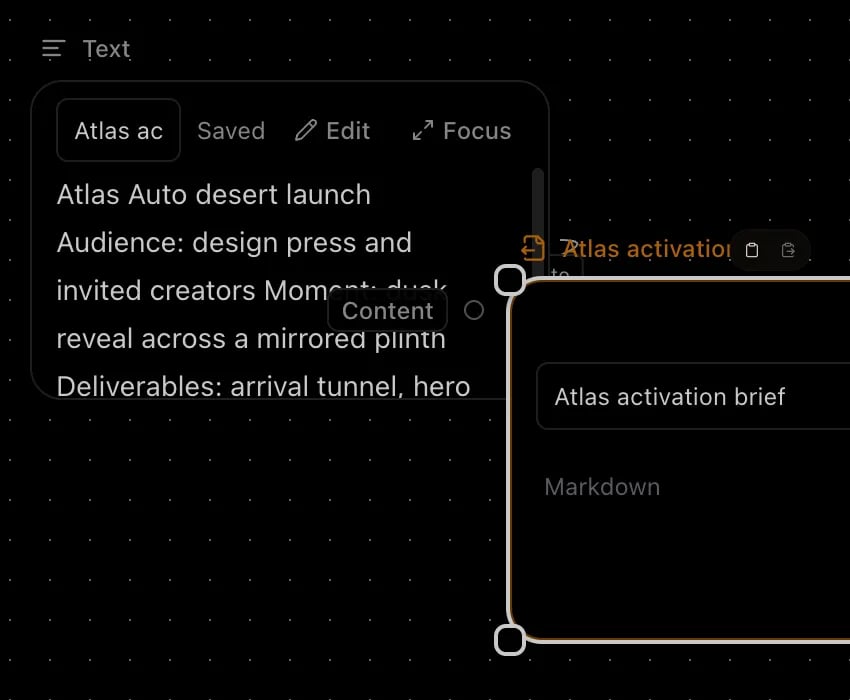
- Select Add node, choose Text, and paste the five supplied lines. Set Text node display label to
Atlas activation brief. - Add an Export node. Drag the Text node’s output port to the Export node’s Content input port.
- Set Export title to
Atlas activation briefand keep Export format set to Markdown. - Select Run export. Open the run inspector and wait for the latest run to show completed.
Walkthrough transcript
The Text node contains the five-line Atlas Auto brief and is labeledAtlas activation brief. Its output is connected to the Export node’s Content input. The Export node has the same title and Markdown format. Selecting Run export creates a completed run, and the result is the ready file Atlas-activation-brief.md.
Check the result
In the run inspector, select the latest Export run and confirm:- Status is completed.
- The associated File resource is ready.
- The filename is exactly
Atlas-activation-brief.md. - Opening or downloading the file shows the five supplied lines.
Troubleshooting
Run export is disabled
Connect the Text node’s output to the Export node’s Content input. A visible line should join the two ports.The filename is Canvas-export.md
Set Export title to Atlas activation brief, then run the Export node again. Changing only the Text node label does not rename the file.
No result appears
Open the run inspector and select the latest run. Wait for completed. If the run fails, keep the Canvas open and retry after the worker or connection recovers; do not create a second export node to hide the failed run.Return to Canvas
Apply the same add, connect, run, and inspect pattern to your current pitch work—or return to the Canvas tab you already have open.